Skip to the content
stage-check Help Mac beta coming soon

My MacBook lost me a hackathon final. So I built the thing that would have told me before I walked up.

stage-check is a Mac menu-bar app that says GO or NO-GO before you go on stage. Every NO-GO comes with the fix, and with the sentence to say to AV when it is their gear.

macOS 14 or later. Proven so far on one Apple silicon MacBook Pro.

Drawing in black, white and yellow of a small event room, seen from the back rows. On stage, a presenter stands at a lectern with one hand on an open laptop and the other on the back of their head. A yellow cable runs from the laptop across the stage and into the wall plate. Behind them the big projection screen is dark except for a yellow box that says No signal. A few people sit in the rows of chairs, waiting.
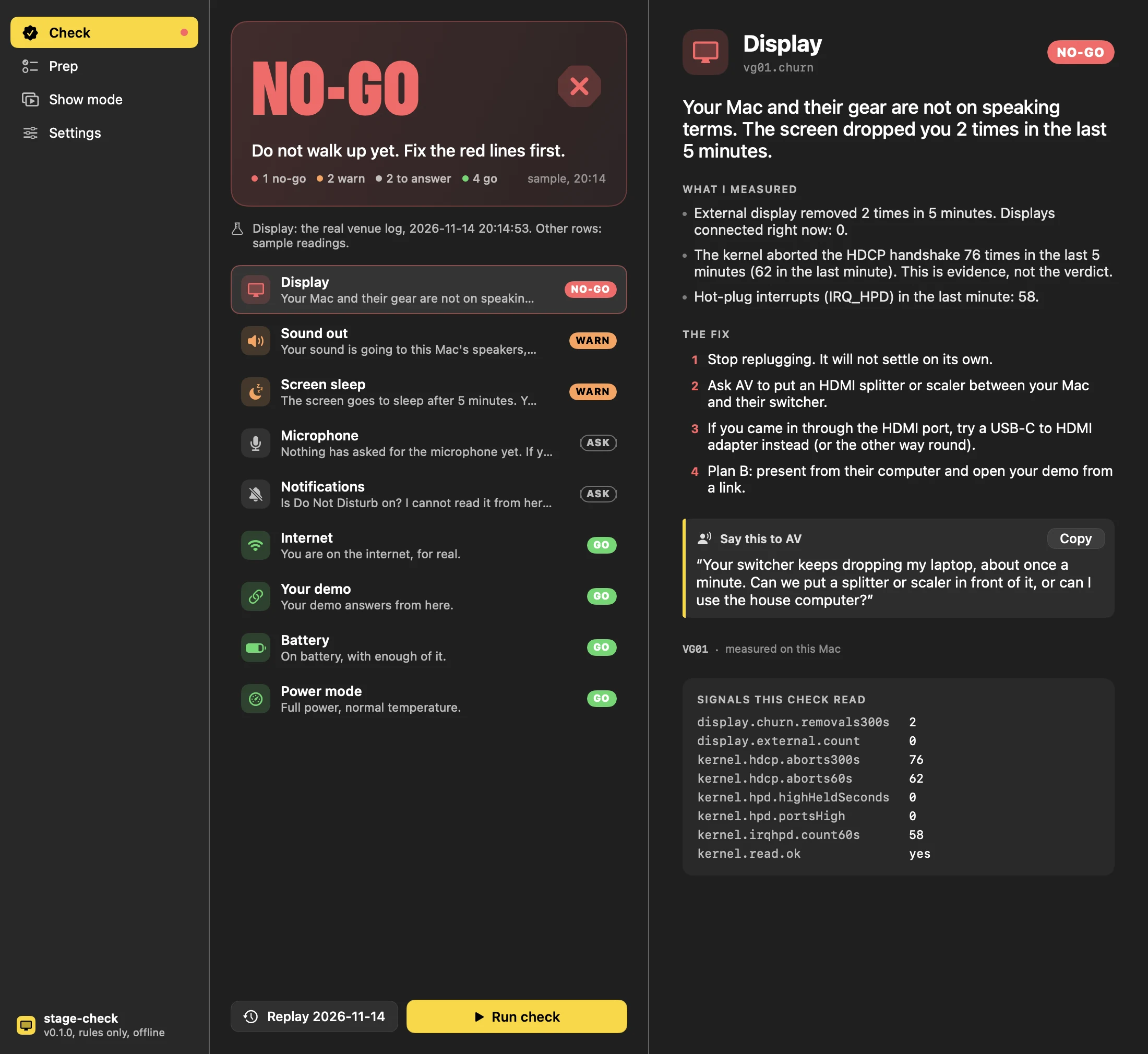
The stage-check panel saying NO-GO: Do not walk up yet. Fix the red lines first. Display: Your Mac and their gear are not on speaking terms. The screen dropped you 2 times in the last 5 minutes.
The app's real NO-GO card: the display row is that night's log, the other rows are sample readings.

One click on the menu bar, and it shows its work.

Every row is measured on your Mac. Every red row says what it saw, what to do, in order, and what to say to AV. This is the app's real Show me window over the log from that night.

The Show me window: the display check in detail, with the evidence, the fix, the line for AV and every signal it read
The display row is the venue log from 2026-11-14 at 20:14:53; the other rows are sample readings. The list at the bottom right is every signal the check read, so you can argue with it.

Their switcher and my Mac were not on speaking terms.

On 2026-11-14 I plugged a MacBook Pro into a hackathon final's video switcher at MongoDB Agents in Context Toronto, by HDMI and then by USB-C. We had made the final six of 98 teams.

macOS found a 1080p screen called "BMD HDMI", which is how Blackmagic Design gear introduces itself. Then it lost it. It found it and lost it 9 times in 17 minutes, in two bursts 12 minutes apart, and no connection lasted a minute. The longest was 53 seconds.

While it was up, the kernel aborted the copy-protection handshake 275 times and fielded 282 hot-plug interrupts. Most of the losses came with their box pulling hot-plug low, which is the far end leaving, not my cable. The first one was me moving the cable to the other port.

Working that out by hand took ten minutes. A final does not give you ten minutes. stage-check reads the same lines in seconds.

2026-11-14 20:13:44.152 E  kernel[0:1ad] (DCPEXT1)  [AppleDCPDPTXController.cpp::3757] DCPAV[266] AppleDCPDPTXController::handleIrqHpdEvent dispatching IRQ_HPD, device=0x672026-11-14 20:13:47.265 E  kernel[0:1ad] (DCPEXT1)  [AppleDCPDPTXHDCP2Controller.cpp::56] DCPAV[288] AppleDCPDPTXHDCP2Controller::abortHDCPNegotiation status=0xe00002eb2026-11-14 20:14:06.354 Df WindowServer[419:115c] [com.apple.coreanimation:WindowServer] Display 2 hot plug 0
HDCP abort statusCountWhat Apple's IOReturn.h calls it
0xe00002eb139kIOReturnAborted, "operation aborted"
0xe00002c1132kIOReturnNotPrivileged, "privilege violation"
0xe00002c04kIOReturnNoDevice, "no such device"

Counted from the evidence file (1,177 lines from this Mac's unified log, 20:12 to 20:31). Status names decoded from IOKit/IOReturn.h in the macOS SDK. The vendor code 0x09A4 in the screen's EDID decodes to BMD.

Replay: 2026-11-14, 20:13:42 to 20:30:40this Mac's own log, played back ×1220:14:53.7
NO-GO

Your Mac and their gear are not on speaking terms. The screen dropped you 2 times in the last 5 minutes.

  • Screen removed, last 5 min 2
  • Screens connected now 0
  • HDCP aborts, last 5 min 76
  • HDCP aborts, last minute 62
  • IRQ_HPD, last minute 58
vg01.churn · VG01
+71 s after the first connect
USB-CHDMIHDCP abortsIRQ_HPD12 min, nothingNO-GONO-GO20:13:4220:16:0520:28:3220:30:40
  1. 20:14:52.1kernel (AppleHPM) AppleTCController::printConnectedTransports(0x0@0x38): AppleTCController::printConnectedTransports(@0x38) - setting USB2 USB3 as DFP | DP [HPD=1,IRQ=0] | , | as connected
  2. 20:14:52.1kernel (DCPEXT1) AppleDCPDPTXHDCP2Controller::abortHDCPNegotiation status=0xe00002eb
  3. 20:14:52.1kernel (DCPEXT1) AppleDCPDPTXHDCP2Controller::abortHDCPNegotiation status=0xe00002c1
  4. 20:14:53.5kernel (AppleHPM) AppleTCController::printConnectedTransports(0x0@0x38): AppleTCController::printConnectedTransports(@0x38) - setting USB2 USB3 as DFP | DP [HPD=0,IRQ=0] | , | as connected
  5. 20:14:53.5kernel (DCPEXT1) AppleDCPDPTXHDCP2Controller::abortHDCPNegotiation status=0xe00002c0
  6. 20:14:53.5kernel (DCPEXT1) AppleDCPDPTXHDCP1Controller::abortHDCPNegotiation abortHDCPNegotiation
  7. 20:14:53.5kernel (DCPEXT1) AppleDCPDPTXHDCP1Controller::shutdownHDCPBlock abortHDCPNegotiation ret=0x00000000
  8. 20:14:53.5kernel (DCPEXT1) AppleDCPDPTXHDCP2Controller::abortHDCPNegotiation status=0xe00002eb
  9. 20:14:53.6WindowServer Display 2 hot plug 0

Every bar, tick and line is a line from the log (1,177 of them, the same lines as the evidence file, unedited; the quiet stretch in the middle is folded). The card is the app's own rules engine run over that log. It says NO-GO at the second drop, 71 seconds after the first connect. With five minutes of history to read back, a run gets there in a few seconds; on a fresh plug-in it takes as long as the switcher takes to drop you.

Nine checks add up to one verdict.

Before a launch, every station answers GO or NO-GO. stage-check polls your Mac the same way. Every line below is the app's real copy, with example numbers filled in, and the grey line under it is what it actually measures.

Close-up of the top of a MacBook screen at 8:13 PM. In the menu bar the stage-check icon shows a green check mark inside a yellow ring, and its panel is open below. The panel says GO, You are good. Go., 9 go, on sample readings. The rows read Display, Sound out, Microphone, Internet and Your demo, each marked GO.
The verdict lives in the menu bar. The panel is the app's real GO screen on sample readings; the laptop around it is drawn.
The panel saying CHECKING with a countdown: trust it in 1:26
CHECKING. A screen plugged in 34 seconds ago is not trusted until it has stayed up for two minutes.
A live run on the build Mac: WARN, screen sleep in 5 minutes
A live run on the Mac this was built on, 2026-11-15 at 00:45: WARN, because the screen sleeps after 5 minutes.
The five menu-bar icons: idle, GO, WARN, CHECKING and NO-GO
The icon is the verdict, so you can read it from across the room.

The screen and the sound

Display

NO-GOYour Mac and their gear are not on speaking terms. The screen dropped you 2 times in the last 5 minutes.

NO-GOThe cable is seen and the other end is answering, but no screen ever arrives. Something in the handshake is failing; the cable itself is answering.

WARNThe screen blinked once in the last 5 minutes. That is how it starts.

NO-GOScreens you said would be here: 1. Screens macOS sees: 0.

CHECKINGThe screen is up, but only for 34 s so far. Ask me again in 86 s.

CGDisplayRegisterReconfigurationCallback from launch, plus five minutes of WindowServer and kernel hot-plug lines from the system log. HDCP aborts are shown as evidence, never as the verdict.

Sound out

NO-GOVolume is at zero. Bold, but no.

WARNYour sound is going to this Mac's speakers, and you said it should go to HDMI.

CoreAudio: the default output, its transport (HDMI, Bluetooth, built in), mute and volume.

Microphone

ASKNothing has asked for the microphone yet. If your demo uses it, open the demo once now so the question comes up here, not on stage.

AVCaptureDevice authorization status, and whether an input exists. It never opens the mic.

The network

Internet

NO-GOYou are on the Wi-Fi, but the Wi-Fi is not on the internet. There is a sign-in page somewhere.

GET captive.apple.com/hotspot-detect.html; the answer must say Success.

Your demo

WARNYour demo runs on this laptop. If this laptop dies, so does the demo.

WARNYour demo answers, slowly. 2400 ms before the first byte.

Your URL: HTTP status and time to first byte. A TCP connect to every host and port you list.

The Mac itself

Battery

WARN34% battery and no charger. It will probably last. Probably is doing a lot of work there.

IOPowerSources: percent, charging, and the adapter's watts.

Power mode

WARNLow Power Mode is on. Your demo will run like it is wading.

ProcessInfo: Low Power Mode and thermal state.

Screen sleep

WARNThe screen goes to sleep after 5 minutes. Your talk is probably longer.

pmset display sleep, the screen saver's idle time, and who is holding the screen awake. Show mode holds it for you.

Notifications

ASKIs Do Not Disturb on? I cannot read it from here, so I am asking.

WARNA screen is connected and chat apps are open (2). Your group chat is about to present with you.

NSWorkspace: how many chat apps are running, never which. Do Not Disturb is asked, not read.

Asked, not measured

Some things cannot be seen from a laptop, so it asks instead of pretending: is the deck downloaded and not just in iCloud, is the backup video on the desktop, is the clicker paired, are the adapter and the charger in your bag. A GO card always lists what it did not check.

When it says NO-GO, it says what to do next.

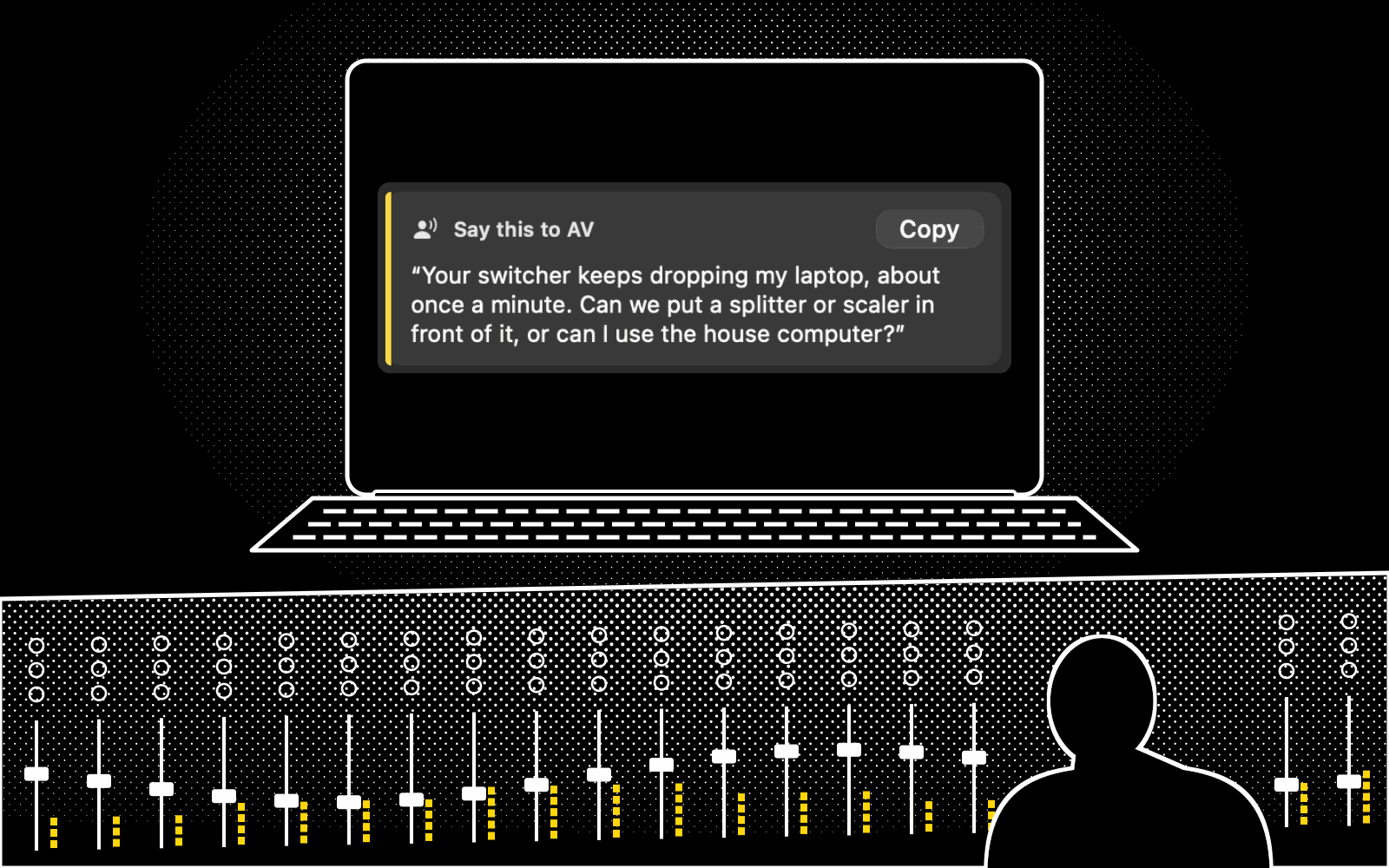
Every red line comes with the steps, in the order to try them. When it is their gear, it gives you the sentence to say to the AV person, with a Copy button for when your voice is not cooperating either.

At the venue's sound desk, seen from behind the AV technician's shoulder. The mixing desk has rows of faders and yellow level meters. Facing them, the presenter's laptop shows a stage-check card titled Say this to AV: "Your switcher keeps dropping my laptop, about once a minute. Can we put a splitter or scaler in front of it, or can I use the house computer?"
Their gear, their desk. Show them the card, or press Copy and send it.

Their switcher keeps dropping you

vg01.churn

Your Mac and their gear are not on speaking terms. The screen dropped you 2 times in the last 5 minutes.

  1. Stop replugging. It will not settle on its own.
  2. Ask AV to put an HDMI splitter or scaler between your Mac and their switcher.
  3. If you came in through the HDMI port, try a USB-C to HDMI adapter instead (or the other way round).
  4. Plan B: present from their computer and open your demo from a link.
Say this to AV

“Your switcher keeps dropping my laptop, about once a minute. Can we put a splitter or scaler in front of it, or can I use the house computer?”

Cable seen, no picture

dv01.handshake

The cable is seen and the other end is answering, but no screen ever arrives. Something in the handshake is failing; the cable itself is answering.

  1. Unplug, wait ten seconds, plug back in once. Not five times.
  2. Try the other port or a different adapter. A USB-C to HDMI adapter often works where the HDMI port does not, because the adapter does the copy-protection handshake.
  3. Ask AV whether their box accepts HDCP sources. Many video switchers do not.
Say this to AV

“My laptop sees your cable but never gets a picture. It looks like the handshake is failing, often the HDCP copy protection. Is there a splitter or scaler we can put in line, or a different input?”

Sound is going the wrong way

ao01.path

Your sound is going to this Mac's speakers, and you said it should go to HDMI.

  1. Open System Settings > Sound > Output and pick the right device.
Say this to AV

“Which input carries audio to the room speakers?”

Anywhere your laptop meets someone else's screen.

A pulpit, a classroom, a DJ booth, a pitch stage. The beta has one profile, for presenters, and its checks are about your Mac: the screen, the sound, the network and the power. Those come with you into any of these rooms.

Four rooms side by side, each in its own frame and drawn the same way: a church pulpit, a classroom, a DJ booth and a pitch stage. In each one the laptop is connected, the screen behind it shows a slide, and a yellow GO speech bubble points at the laptop.

It decides by written rules, not by guessing.

Every verdict comes from a measured signal and a written rule: 56 rules. The display rules are replayed against the real venue log in the test suite, and 28 of the 56 are named in a test by id. 38 of the rules name a failure and carry their own evidence and fix; the rest say why a row is GO, or what it has to ask you. A check that cannot measure its signal says SKIPPED, never GO. A screen that has been up for less than two minutes is CHECKING, never GO.

The beta has no AI, no account and no analytics. AI help comes later, and only explains: it will read the same report you can see here, put it in plain words, and never change a verdict.

This is all a report holds: statuses, numbers and rule ids. It is a real one, from the Mac this site was built on, at 2026-11-15 23:44.

  • No screen names, beyond a 3-letter maker code
  • No Bluetooth or audio device names
  • No Wi-Fi names or IP addresses
  • No URLs or hostnames
  • No file names or app names
  • No screenshots, audio or log lines
{
  "schema": 1,
  "app": "0.1.0",
  "os": "27.2",
  "chip": "Apple M2 Pro",
  "profile": "presenter",
  "verdict": "warn",
  "checks": [
    {
      "id": "display.external",
      "modes": [
        "DV01"
      ],
      "rule": "display.none",
      "signals": {
        "display.churn.removals300s": 0,
        "display.external.count": 0,
        "kernel.hdcp.aborts300s": 0,
        "kernel.hdcp.aborts60s": 0,
        "kernel.hpd.highHeldSeconds": 0,
        "kernel.hpd.portsHigh": 0,
        "kernel.irqhpd.count60s": 0,
        "kernel.read.ok": true
      },
      "status": "ask"
    },
    {
      "id": "audio.output",
      "modes": [],
      "rule": "audio.go",
      "signals": {
        "audio.output.muted": false,
        "audio.output.present": true,
        "audio.output.transport": "builtIn",
        "audio.output.volumePercent": 88
      },
      "status": "go"
    },
    {
      "id": "power.sleep",
      "modes": [
        "PW04"
      ],
      "rule": "pw04.soon",
      "signals": {
        "screensaver.idleMinutes": 20,
        "sleep.assertionHeld": true,
        "sleep.displayMinutes": 5,
        "sleep.heldByShowMode": false
      },
      "status": "warn"
    }
  ]
}

Questions people ask right before they go on

Is it my Mac or their gear?

It tells you which, and how sure it is. The display check reads the hot-plug lines in the system log. When the far end keeps pulling hot-plug low, that is their box taking itself away, and the card says so. At our venue the Mac enumerated a Blackmagic display, "BMD HDMI", and lost it nine times.

Does it fix anything for me?

One thing. Show mode holds the screen awake while you present. Everything else it tells you, in order, with the sentence to say to AV. It does not change your settings behind your back.

Why would it want the microphone?

It does not need it. The microphone row checks that macOS has an input and whether permission has been given. It only asks for permission when you tap "Ask for the microphone now", and the beta never records anything.

Does it read my screen or my messages?

No. It never asks for screen recording. For notifications it counts how many chat apps are running and asks you whether Do Not Disturb is on, because there is no way to read that we trust yet. It never sees a message.

Does it work on Intel Macs?

Not tested yet. Everything so far was proven on one M2 Pro MacBook Pro on macOS 27.2. Until an Intel Mac has been through it, we will not say it works on one.

What is HDCP and why does it hate me?

HDCP is the copy protection that runs over HDMI and DisplayPort. The University of Toronto chemistry IT FAQ says Apple silicon MacBooks are "extremely strict with EDID and HDCP handshakes", and that a USB-C to HDMI dongle often helps because "the dongle negotiates HDCP instead of the Mac". At our venue the kernel aborted the handshake 275 times in 17 minutes.

Windows?

Not yet. The Mac app comes first, because the check that matters most reads the Mac's own system log.

Why not the Mac App Store?

The display check reads the system log, and Apple's own header for that API says the caller must run as an admin account. We have not found a way to read it from inside the App Store's sandbox, so the beta will be a download from this page.

When can I download it?

When it is signed and notarized, so macOS opens it without a fight. There is no waitlist form: we did not want your email before we had something to send you. Check back here.

Privacy, in plain words

The app runs on your Mac and keeps what it finds there. It sends nothing to us. The only network traffic it makes is the checks you can see: Apple's captive check, your demo URL, and the ports you list.

This website has no cookies, no analytics, no forms and no third-party scripts or fonts. The full version is a draft until it has been read by the person who signs it.

The stage-check app icon: a yellow port shape with a check cut into it, on a black tile

The Mac beta is coming soon.

It is free while it is in beta, with no account, no card and nothing to cancel.

There is no waitlist form. When there is something to download, it will be here, signed and notarized, and this page will not have asked for your email first. Until then: unplug, count to ten, plug in once, and if their switcher drops you twice, stop replugging and ask for a scaler. That part is free forever.

macOS 14 or later.